Never Miss a Maintenance Task
Core Capabilities
Complete Task Management System
Track maintenance, assign work, and ensure accountability across your entire fire service
Actions are created automatically when inspections identify failed items or missing/expired components—inspection findings immediately become tracked work.
Brigade members can create actions for general maintenance needs, requests, or issues that arise outside the inspection process.
Community members can submit issues via your brigade page without logging in, ensuring public accountability and transparency.
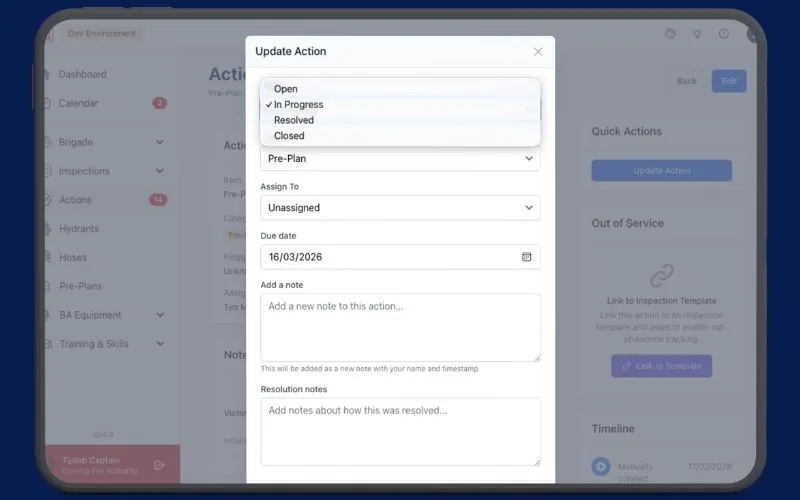
Assign actions to specific team members, set due dates, and track completion targets with automatic overdue highlighting.
Actions progress through Open → In Progress → Resolved → Closed, providing clear status visibility and accountability.
Mark assets as out of service when resolving actions, preventing their use until repairs are verified and complete.
Classify actions as Vehicle, Equipment, Stock, Building & Maintenance, PPE & Uniform, IT, or Other for better organization.
View My Actions, Unit Actions, By Category, or By Source with powerful filtering for workload management and reporting.
Clear Workflow
Four-Stage Action Lifecycle
Progress Through Defined Stages
Clear workflow stages provide visibility into what's happening, who's responsible, and what needs attention next.Open
Newly created actions awaiting assignment or work to begin. Clearly visible in team dashboards.
In Progress
Actions actively being addressed by assigned team members. Track who is working on what.
Resolved
Work completed and awaiting verification. Ensures quality control before final closure.
Closed
Verified and complete. Actions are archived with full history for compliance and reporting.
Safety First
Out of Service Management
Keep Unsafe Equipment Out of Service
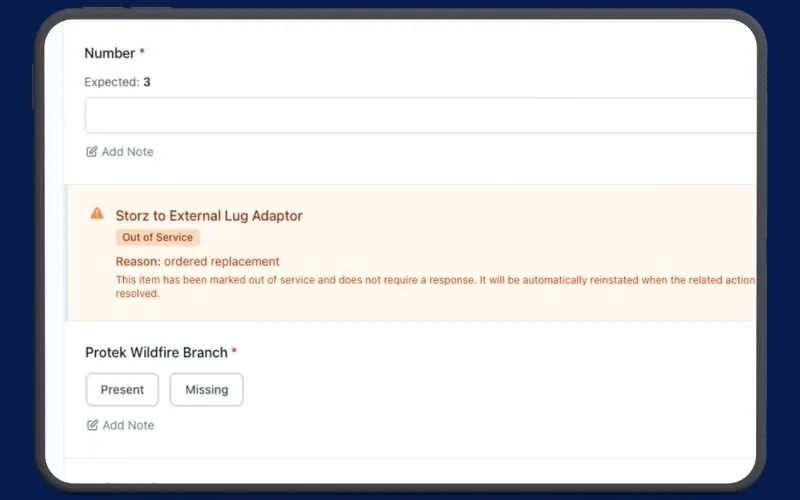
When something fails an inspection or requires maintenance, you can immediately take it out of service—protecting your crew and ensuring only ready equipment is deployed.Prevent Unsafe Usage
Mark vehicles, equipment, or assets as out of service when resolving actions to prevent their selection in inspections or operations.
Automatic Reinstatement
Assets are automatically returned to service when actions are verified and closed—no manual updates required.
Clear Status Visibility
Out of service items are clearly marked across the platform, ensuring everyone knows what's unavailable.
Compliance & Safety
Ensure that only operational, compliant equipment is used while repairs and maintenance are underway.
Community Engagement
Public Issue Reporting
Empower Your Members
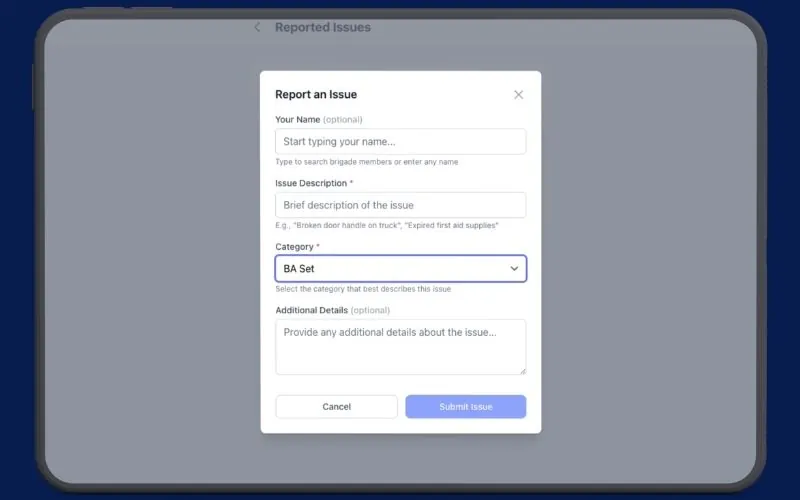
Let your members report issues they notice at your station or facilities, creating transparency and assisting in rapid resolution of issues.No Login Required
Brigade embers submit issues directly from your public brigade page without creating accounts on their own devices.
Limited Categories
Public reporters can select from Building & Maintenance, PPE & Uniform, IT, or Other to keep submissions focused.
Optional Feature
Enable or disable public reporting based on your brigade's preferences.
Ready to streamline your maintenance?
Join fire services using StationOne to track every task, ensure accountability, and never let critical maintenance fall through the cracks.